Cheapest DIY Stainless Cable Deck Railing Pt.5: INSTALLATION - Running the cables through the posts

Watch the Video:
Part 5 in my series on installing stainless cable deck railing on the cheap. In this video, I show how to install the stainless cable after the post holes are drilled. This covers running the cable, cutting to length and crimping the hardware.
These are the crimping and cutting tools that I use:
Titan 11980 Hydraulic Cable Crimper - This tool comes with a large set of dies, so I will be able to use it in the future for crimping electrical connectors and swaging cables. Cable railing retailers will rent crimpers, but the rental cost is as much as buying this tool.
Cable Cutters - I recommend the larger 13" to 18" cutters, like these for ease of cutting. Most of the cable sellers on Amazon are trying to sell the small cable cutters, like these. However, I do not recommend these small cutters, because I found them to be very difficult to cut the 1/8in 1x19 cable without pinching your fingers. I think the larger strands make it difficult to cut.
This is the stainless cable deck railing hardware that I purchased.
This was the cheapest price that I could find and appears to be the same quality as the hardware sold by other brands on Amazon.
$219.77 for 1000 Ft 1/8" 1x19 Cable Rail Korean Made Wire Stainless Steel 316
If you don't need 1000ft of cable, try this alternate brand of 1x19 cable that has many different lengths available
$96.99 for 100 Pack Stainless Steel Threaded Terminal Tension Stud End for 1/8 Cable
$98.99 for 100 Pack Stainless Steel Stemball Cable Dead End for 1/8 Cable
$9.99 for 100 Pack 1/4 Inch Stainless Flat Washer
Total Cost for hardware was only $425.74 which is $1000's less than buying from cable railing retailers. The main savings are the cable terminals. Cable railing retailers sell their terminal sets at prices upwards of $10-$15 a pair. The ones I bought cost less than $2 a pair. That adds up quickly when you have a lot of deck corners that weren't designed for cable railing, and therefore need to terminate the cables at each corner.
Most Amazon stainless cable sellers are selling the 7x7 1/8in cable instead of the 1x19 configuration. The 1x19 is preferred for cable railing because it has larger individual strands. That makes it more rigid, stronger, and more aesthetically pleasing. It was more difficult to find, but I finally found this high quality, made in Korea, stainless 1x19 1/8in cable. https://amzn.to/3hgJFTM It only cost $220 for 1000 ft, making it $0.22 per foot, which is less than half the price that cable rail retailers want to sell their cable!
Additional installation tools that I had to buy:
- Titan 11980 Hydraulic Cable Crimper https://amzn.to/2DPUptF - This tool comes with a large set of dies, so I will be able to use it in the future for crimping electrical connectors and swaging cables. Cable railing retailers will rent crimpers, but the rental cost is as much as buying this tool.
- Cable Cutters - Most of the cable sellers on Amazon are trying to sell the small cable cutters, like these: https://amzn.to/2WKvcHA However, I found those to be very difficult to cut the 1/8in 1x19 cable without pinching your fingers. I think the larger strands make it difficult to cut. Therefore, I would recommend the larger 13" to 18" cutters, like these: https://amzn.to/32PBCtb
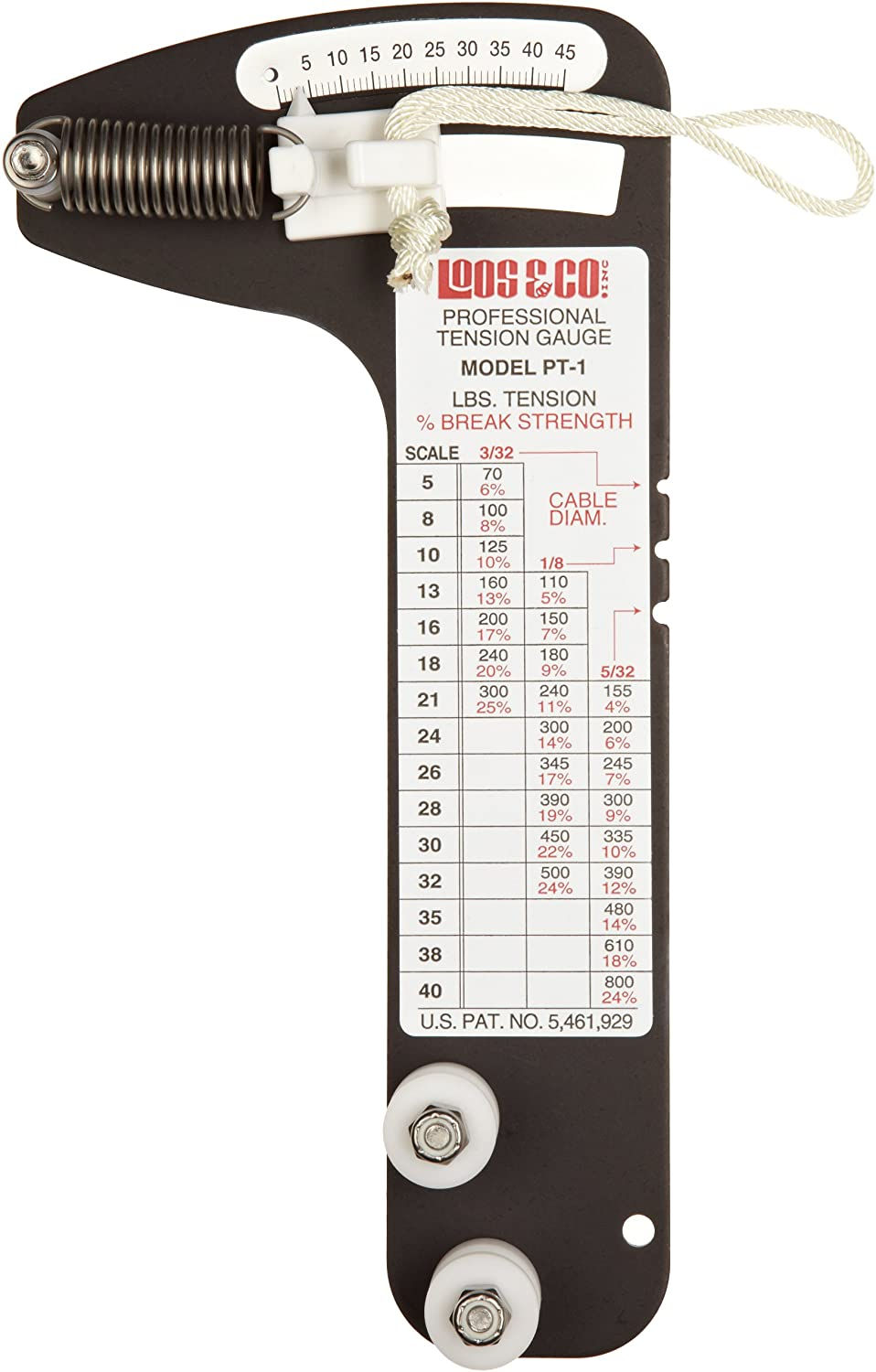
- Cable Tension Gauge - Although not absolutely necessary, it will help you tighten the cables consistently to all the same tension. 1/8in stainless cables have to be tensioned between 150-300lbs to prevent a 4-inch sphere from passing between the cables. The tension required to meet that specification will vary depending on the spacing of the posts.
These are tools that are used to drill the wood posts.
Details can be seen in this Video Pt.3:
- Wolfcraft 4525404 Multi-Angle Drill Guide: https://amzn.to/3fMw2v5 - IRWIN QUICK-GRIP Bar Clamp, One-Handed, Medium-Duty, 12-Inch: https://amzn.to/2CSC6nq - Ryobi 18V Cordless Brushless Drill: https://amzn.to/39dsFef - 1/4in Diameter by 12in Long Drill Bit - A standard drill bit can barely make it through a 4in post. The longer drill bit is necessary when drilling at an angle, like for posts on the staircase.
Check out the whole series of stainless cable railing videos in this playlist: https://www.youtube.com/playlist?list=PLJZvr9eL7PeyHeBj51cTain6uAiDfz9lX
Video Timeline 0:00 - Intro 0:03 - Running The Cable Through Post Holes 0:37 - Crimping The Stemball Dead End 1:43 - Finishing The Dead End 2:01 - Measure And Cut Cable 3:00 - Crimp the Threaded End 3:56 - Finishing the Threaded End 4:15 - Conclusion 5:16 - Watch the other Videos https://www.youtube.com/playlist?list=PLJZvr9eL7PeyHeBj51cTain6uAiDfz9lX
The products shown here were purchased by me with the intent to use. I did not receive any free items, and I am not being paid or compensated for this review. The video and description may contain affiliate links. If you click on a link, I may receive a commission. Money earned helps to support my channel and bring you more informative videos about engineering, crafting, and DIY.


xosoplus.mobi dạo này thấy bạn bè nhắc hoài nên mình cũng ghé thử cho biết, kiểu vào xem giao diện họ làm ra sao thôi. Vừa mở lên là thấy phần tiêu đề chia theo XSMB theo ngày nhìn khá dễ nắm, nhất là đoạn có ghi rõ “XSMB ngày 19 07 2026” với mục dự đoán cho 20 7 2026 nên không bị lẫn kỳ. Mình ưng nhất là cách họ bày dữ liệu dạng khối, nhìn lướt cái là hiểu, không phải cuộn qua lại nhiều. Cái bảng “Đầu lô tô Đuôi lô tô” để riêng thành block nên mắt bắt nhanh, chữ số xếp gọn gàng chứ không rối. Nói chung cảm giác họ ưu tiên cho…
https://luck821.com/ mình thấy mấy đứa bạn share qua nên tiện tay mở thử coi trang trông ra sao thôi, chứ không có ngồi đọc kỹ hay làm gì nhiều. Vừa vào là thấy giao diện khá sáng sủa, nhìn không bị rối mắt kiểu chữ dày đặc. Mình để ý họ chia nội dung theo từng khối rõ ràng nên lướt xuống khá nhẹ, không bị “ngợp” như vài trang hay nhồi thông tin. Cái mình thích nhất là mấy phần thông tin trình bày theo dạng cột/bảng gọn gàng, nhìn cái là hiểu ngay đang ở mục nào, không phải kéo qua kéo lại tìm. Menu cũng đặt dễ thấy nên chuyển trang nhanh, không cần bấm lòng vòng.…
X8 mình thấy mọi người nói hoài nên cũng bấm vào coi thử cho biết, kiểu tò mò giao diện thôi chứ không có ngồi “nghiên cứu” gì đâu. Vào cái là mình để ý ngay trang nhìn khá thoáng, không bị nhồi chữ hay nhảy lung tung nên lướt một hơi cũng đỡ mệt mắt. Mấy phần nội dung họ chia theo từng khối rõ ràng, kéo xuống tới đâu biết mình đang ở mục nào tới đó, không bị rối. Mình cũng thích cái menu đặt chỗ dễ thấy, bấm qua lại nhanh gọn chứ không phải mò vòng vòng mới ra. Nói chung cảm giác dùng khá nhẹ nhàng, nhất là cách họ chia block nội dung…
nhà cái rr88 mình cũng kiểu nghe nhắc hoài nên bấm vào nghía thử cho biết. Mình không rành mấy trò đâu, chủ yếu xem trang có dễ dùng không với thông tin có rõ ràng không. Vừa vào là thấy giao diện khá sáng sủa, chữ với khung nội dung tách bạch nên lướt nhanh vẫn nắm được ý, không bị rối mắt. Có một đoạn họ để thông tin về nguồn gốc pháp lý khá ngay ngắn, đọc lướt cũng hiểu đại khái chứ không phải đi tìm vòng vòng. Mấy mục trên menu đặt chỗ dễ thấy nên chuyển qua lại cũng tiện, cảm giác thao tác mượt. Nói chung mình ấn tượng nhất là cách họ…
sunwin dạo này thấy mọi người nhắc hoài nên mình cũng ghé thử cho biết chứ không có ý “nghiên cứu” gì đâu. Vào cái là mình để ý giao diện nhìn khá sáng sủa, khoảng trắng vừa đủ nên không bị rối mắt. Mình lướt xuống vài đoạn thấy họ chia nội dung theo từng khối tách bạch, kiểu nhìn phát biết phần nào ra phần đó, không phải căng mắt dò. Cái mình thích là menu để ngay chỗ dễ thấy, bấm qua lại mượt, không bị vòng vo tìm nút. Mấy chỗ thông tin trình bày dạng bảng cột nhìn gọn, chữ dễ đọc nên lướt nhanh vẫn hiểu ý. Nói chung trải nghiệm kiểu “vào là…