Everything About HAAS TM-1 CNC MILLING MACHINE | How To Use, Repair, Upgrade, Mod, Fix, Tooling
I'm documenting the process of owning a HAAS TM-1 CNC Milling Machine. What's it like to buy a used HAAS TM-1 CNC milling machine? How to move a HAAS TM-1. How to repair and fix problems that arise during use. How to upgrade the memory or use a DNC transfer device to load larger files. What kind of CAT40 tooling to buy, and where to buy it and find good deals?
DISCLAIMER - Any and all of the info shown here is for entertainment purposes only. Do not attempt any modifications or repairs shown on this website or associated videos. Only a qualified technician should work on equipment.
HOW TO
BUYING AND MOVING
UPGRADES
Memory Upgrade Using DNC File Transfer and Drip-Feed Device Over RS232 Serial Port
Floppy To USB Converter Emulator Kit For HAAS CNC and other CNC machines
How To Increase HAAS TM-1 Spindle Speed from 4000 RPM To 6000 RPM
How To Increase HAAS TM-1 Rapid Speed from 200 IPM To 400 IPM
How To Remove The Red Handles For Improved Axis Acceleration and Motion
Remote Jog Handle RJH Installation
REGULAR MAINTENANCE
How To Lubricate Tool Release Piston
REPAIRS
TOOLING
Buying the used 2005 HAAS TM-1 CNC milling machine was easy. Moving it to our shop was a whole different story. Even though this machine is small enough to be moved around on a standard pallet jack, or a powered pallet jack, the only shippers who know how to deal with it are riggers, and they charge $$$$$. Read more about our adventures buying, moving, and setting up the machine...

UPGRADES
HAAS TM-1 Milling Machine Memory Upgrade Using DNC File Transfer and Drip Feed Device Over RS232 Serial Port
The stock memory in a HAAS CNC machine pre-2007 or so is only 1MB (however there is 16MB onboard, but it is locked). You can pay $$$$ to unlock the 16MB. The only way to load files is to use the floppy drive, or over RS232 serial. The floppy drive has a limited capacity and the file still needs to be copied over to the machine to run, taking up precious memory space.
I purchased the Micro DNC 2, because it allows you to upload files (no size limit) from a USB key to the HAAS CNC through RS232. If the file is too large to upload in memory, it can drip-feed the file over RS232. So far it has worked great. Here are some videos about using it:
The MICRO DNC 2 has been working great so far, but suddenly it was saying that there's "No System Disk", which means that it was no longer recognizing the internal micro SD card. Watch how I fixed that issue:
Floppy To USB Converter Emulator Kit For HAAS CNC and other CNC machines
Older HAAS and other brand CNC machines have floppy drives for file transfer. This is very inconvenient in the modern world. There are floppy drive emulators that replace the floppy drive with a USB key drive. The 1.44MB capacity limit remains the same, but you can save up to 100 1.44MB spaces on one USB key.
▼ WHERE TO BUY

Adding A Tool Changer
The HAAS TM-1 came without a tool changer. A HAAS TM-1P does have a tool changer (and these days a full enclosure). HAAS was not willing to sell a tool changer for an open machine. The Mini Mill uses the same 10 tool umbrella style changer as the TM-1, therefore I was able to find some new take off tool changers from Mini Mills that were being converted to EDM machines. This is the process of installing them on our TM-1 CNC milling machine.
PART 1. Installing the tool changer support arm. The missing link was the tool changer support arm. HAAS was willing to sell us this part for our machine, and had me check the top of the column to make sure that it had the mounting points.
PART 2. Umbrella shuttle motor install. HAAS charges a lot for a replacement umbrella too changer motor. The motor is a stock LEESON motor and less expensive replacements can be found elsewhere. Also, the first thing to check in a failed motor like this one is the brushes. If the brushes are worn out, then it could be a very inexpensive and easy replacement vs replacing the whole motor.
PART 3. Repositioning the motor such that there is a drip loop. It was pointed out that having the motor wires face upwards could cause coolant/water to drip down into the motor.
Replacement Battery Upgrade for Memory
The stock memory batteries are soldered to the circuit boards. When they need replacement, another battery must be plugged into the battery backup port on the board in order to not lose the memory and all settings.
Dual Battery upgrade kit from HAAS (uses BR or CR-2/3A style batteries)
Rechargeable Battery Backup Kit for Haas CNC Machines. Better Than 93-32-4306 /7
It would be very easy to DIY a dual battery kit. Holders for CR-2 batteries are common, but mostly for PCB mount. The HAAS battery holder has some diodes between the batteries to prevent then batteries from discharging into each other.
This dual holder is for CR123A, which is a larger battery with more capacity. CR2 has a capacity of 600-900mAH, whereas CR123 has a capacity of 700-1700mAH.

Someone posted a 3D printable DIY dual battery upgrade kit for HAAS but didn't post any info about the connector dimensions.

Safety Switch Bypass
The HAAS TM-1 has a safety switch that by default must be pressed and held for a program to run. Releasing the button is like pressing the feed hold button. This is good for safety and proving out a program, but a pain for running a long program.
There is a way to bypass this setting in the parameters, but it must be done every time the machine is restarted.
Safety Switch Holder (keeps the button pressed)
The HAAS TM-1 has a safety switch that by default must be pressed and held for a program to run. Releasing the button is like pressing the feed hold button. This is good for safety and proving out a program, but a pain to hold for running a long program.
Someone has come up with a solution and posted it on Thingiverse. https://www.thingiverse.com/thing:5499385

This appears to be a functional solution, but it's difficult to remove the switch if it needs to be used manually. I would prefer a design that allows me to quickly remove the switch when needed.
Y Axis Home Switch Cover
The Y axis switch is not very well protected, particularly from flood coolant. It's a known leak point for coolant. Helton designed a better cover that protects the switch against flood coolant and prevents coolant from leaking out. It fits tightly and slides over the existing feature.
Download the 3D printable file here: https://cults3d.com/en/3d-model/tool/haas-tm-1-cnc-y-axis-switch-cover-engineerable


CAT40/10 Carousel Segmented Tool Disk
The stock carousel disk is cast aluminum and prone to cracking due to stuck tools or tool holder crashes. Some people make and sell machined aluminum segmented tool disks. These have individually replaceable forks, so if one gets damaged, it can be easily replaced without having to replace the whole tool disk.
▼ WHERE TO BUY

Remote Jog Handle RJH Installation
The TM-1 didn't come with a Remote Jog Handle (RJH), and for a machine like this, it would be really nice. They can be purchased from HAAS, but it's not cheap! I waited until I found a used one. A CNC of this vintage requires an older style RJH that only has the Jog handle, cycle start and feed hold buttons, and the axis and increment selector switches. The RJH that has a screen is for newer machines.
Here's where the RJH connects into the Serial Keyboard Interface PCB inside the control panel.

REGULAR MAINTENANCE
How To Lubricate Tool Release Piston | HAAS TM-1 CNC Milling Machine Spindle Maintenance
The tool release piston on the HAAS TM-1 (TM-2) requires occasional lubrication. If you have the spindle cover off for other maintenance, it doesn't hurt to lubricate the piston while you're in there. I use Superlube synthetic grease which is supposed to work well with o-rings.
▼ WHERE TO BUY
Lubricating The Linear Ways With Grease
The old grease had hardened and grease wasn't flowing to all the linear bearings evenly. I had to remove the lines from the splitter and push grease into each bearing individually to remove the old grease and flush the lines. The new grade that HAAS recommends is not supposed to harden.
GREASE
Per Haas Website:
Toolroom Mill
Mobil Grease XHP 222
Mobil 1, Synthetic Grease
2 full strokes monthly
99-0677
REPAIRS
Service Manuals
I couldn't find the 2005 electrical service manual, but here's the 2006 which should be very similar.
HAAS Fix Tool Release Issues due to defective Humphrey valve clogging the air lines | TM-1 Mini-Mill
This video shows an easy fix to tool release issues for a HAAS TM-1 and similar models like the HAAS Mini Mill. The problem, in this case, is clogged air lines and a defective Humphrey valve SQE2 (Super Quick Exhaust valve).
The Humphrey valve has a rubber valve inside that is designed to allow air to only flow in one way and out the exhaust. In this situation, it is being used slightly differently, where low-pressure air enters on one side, high-pressure air enters the exhaust, and then all the air is released out the exhaust. The rubber valve inside that controls the airflow direction has turned into goo, and pushed out the low-pressure airline, clogging some of the low-pressure components.
The easy fix is to clean the goo out of the airlines and fittings and replace the Humphrey valve with the same SQE2 valve. However, I've seen people complaining about Humphrey valve failing in 5-10 years. I want something more durable, so instead of buying a Humphrey brand valve, which I know will fail the same way in 5-10 years, I bought this Parker/Legris valve which I hope will last longer https://amzn.to/3fXwRpT
Fix HAAS tool release video Part 1:
Fix HAAS tool release video Part 2:
Replace Motor Mount Vibration Isolation Bushings
When we took the spindle cover off the 2005 HAAS TM-1 to repair the tool release piston that was not working well due to clog lines because of the failed Humphrey valve, we also discovered that the rubber motor mount bushings were turning to mush. The rubber has degraded, leaked oil and appears to be breaking down. it no longer holds the motor tightly. I will need to replace these bushings.
Isolator bushing measurements
ID = 0.695in
Small OD = 1 in
Large OD = 1.25 in
Flange Height = 0.20 in
Total Height = 0.5 in
▼ WHERE TO BUY
▶ ISOLATOR, GEARBOX - Pack of 4 Part #: 93-3443 - https://www.haascnc.com/haas-service-parts/spindles/gearbox_drive/mounts/93-3443.html
What's Inside A Keyless Drill Chuck? (How To Take Apart)
TOOLING
HAAS Brand Mill Tool Holding
HAAS sells very reasonably priced mill tool holders. Most of them are made in China, but HAAS has tight quality control.
Cheap CAT 40 1/4" x 1.75" End Mill Tool Holder
This CAT40 1/4" x 1.75" end mill holder is cheap. HAAS tooling website doesn't have end mill holders below 0.5in, they're made in China anyway, so I'm trying these.

3/8in CAT40 Integral Drill Chuck (Untested)
Cheap but Good 1/2in CAT40 Integral Drill Chuck
▼ WHERE TO BUY
Similar CAT40 1/2in Integral Drill Chucks can be purchased on eBay for as little as $37.50 each when bought in 4 packs.

Cheap but Good 5/8in CAT40 Integral Drill Chuck
▼ WHERE TO BUY
▶ On eBay for $146 for qty 4 ($36.50 each) (Untested)
Cheap but Good 3/4in CAT40 Integral Drill Chuck
▼ WHERE TO BUY
Cheap but Good Pull Stud
▼ WHERE TO BUY:
CAT40 Tool Tags
Keeping track of tool numbers, offsets, and other tool info is important once the tools are off the machine. Tool tags make it easy to keep track of it. There are 2 main types of tool tags available for CAT40 tools, magnetic and clip on. The magnetic ones can be used for any tools that it will stick to. The CAT40 clip-on tool tags only work with CAT40-size tools. The ideal tags I would like are clip-on with magnets, so you can stick the magnets to the machine when the tools are inside.
This yellow tool tag is the commonly available one.

I improved the design and 3D printed them. Added some magnets to allow them to stick to tools and tool holders and also the CNC enclosure when the tool is inside the CNC machine.
▼ WHERE TO DOWNLOAD 3D FILES FOR PRINTING
▶ BAUEN CAT 40 TOOL TAG - https://cults3d.com/:1829978
▼ WHERE TO BUY PARTS
▶ 5x3mm Magnets - https://amzn.to/3uYljdR
▶ PLA + Filament - https://amzn.to/3TkqKgF
▶ ELEGOO Neptune 4 Pro 3D Printer - https://amzn.to/3P6ZHD0
Tool Tag Towers are useful for storing multiple tags in their tool changer locations while the tools are being used in the machine.

Maritool also sells a similar magnetic tool tag.
Tool Height Presetter
Industrial tool height presenters are complex and very expensive. For the Tormach TTS tooling system, we've been using the granite block with height gauge since the beginning and have had no issues with that method. The same method could be used for CAT40, but the CAT40 tool must be held in place using the taper, not the flange like Tormach TTS tools locate to.
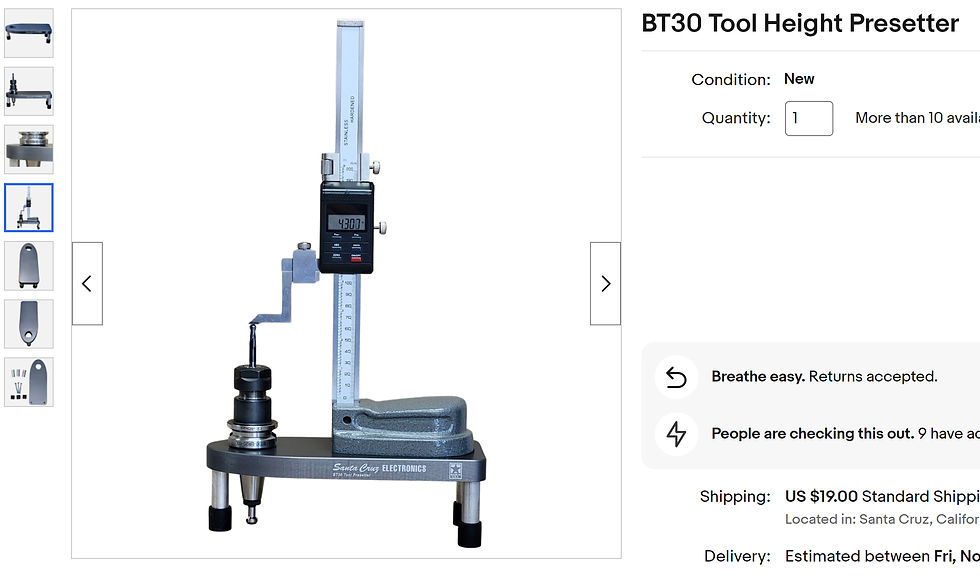
This BT30 tool height presetter is basically what I'm looking for, but I can't find a CAT40 model, so I may need to make my own.
Tapping Tool Holders
Rigid tapping (synchronized tapping) is the holy grail of tapping threads using a CNC machine. If your CNC has rigid tapping enabled (Usually an add-on option for HAAS TM-1 milling machine), then it's easy to tap holes using a rigid tap holder. You can also turn on repeat tapping for deeper holes to do them in multiple depth steps.
Techniks makes a MicroFLOAT tap holder that is designed to work with rigid tapping and improve tap life. It has a very small amount of float, 0.008″ (.2mm) of compression and 0.040″ (1mm) of tension. The spring is also much stiffer. The idea is that it allows the tap to float just enough so that it "compensates for synchronization errors between the spindle rotation, feed rates, and thread pitch that create destructive forces on your taps during a rigid tapping cycle, to reduce unwanted axial forces on the tap to produce the truest possible threads and extend tap life."
Floating CAT40 Tap Holder
This is a normal floating tap holder designed to be used with machines that don't have rigid tapping. It's normally frowned upon to use a floating tap holder for rigid tapping, and can even cause issues (if the tap doesn't enter right away, the depth can be off). However, I wonder if the spring force could be increased to the point that it is basically a MicroFLOAT tap holder, and only has a small amount of very firm float.


Comments