How To Increase HAAS TM-1 Rapid Speed from 200 IPM To 400 IPM for X, Y, and Z Axis.
DISCLAIMER
The following info are changes that were made to our equipment and for our reference only. Do not attempt to make any changes to your equipment. Only certified technicians with the proper skills are permitted to make changes to equipment.
Open TM-1 machines had spindle speed limited to 4000 RPM and rapids limited to 200 ipm for safety reasons. An enclosed TM-1 has a 6000rpm spindle and 400 ipm rapids. We're going to enclose our TM-1 milling machine, so we can increase the spindle rpm and the rapids speed.
STEP 1: Unlock The Parameters
1) Press Emergency stop.
2) Press the SETNG/GRAPH key.
3) Type 7 then press the down arrow.
4) Use the Left or Right Arrow to change to OFF.
5) When OFF is shown press WRITE/ENTER.
STEP 2: Change The Parameter Settings for X
1) Press PARAM/DGNOS key.
2) Enter 7.
3) Press down arrow.
4) Change parameter 7 (ACCELERATION) from 3000000 to 6000000 and press WRITE/ENTER.
7) Change parameter 8 (MAX SPEED) from 462394 (which is 200ipm) to 924788 (which is 400ipm), and press WRITE/ENTER.
STEP 3: Change The Parameter Settings for Y
1) Press PARAM/DGNOS key.
2) Enter 21.
3) Press down arrow.
4) Change parameter 21 (ACCELERATION) from 3000000 to 6000000 and press WRITE/ENTER.
7) Change parameter 22 (MAX SPEED) from 462394 (which is 200ipm) to 924788 (which is 400ipm), and press WRITE/ENTER.
STEP 4: Change The Parameter Settings for Z
1) Press PARAM/DGNOS key.
2) Enter 21.
3) Press down arrow.
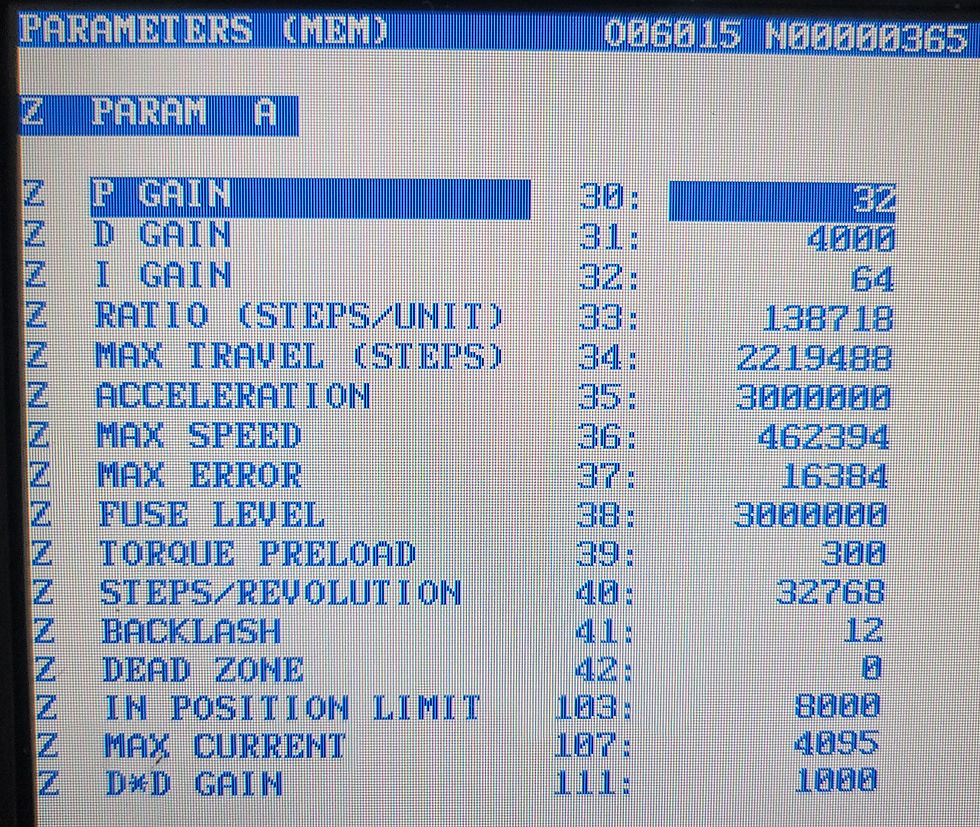
4) Change parameter 35 (ACCELERATION) from 3000000 to 6000000 and press WRITE/ENTER.
7) Change parameter 36 (MAX SPEED) from 462394 (which is 200ipm) to 924788 (which is 400ipm), and press WRITE/ENTER.
STEP 5: Relock The Parameters
1) Press Emergency stop.
2) Press the SETNG/GRAPH key.
3) Type 7 then press the down arrow.
4) Use the Left or Right Arrow to change to ON.
5) When ON is shown press WRITE/ENTER.
These are the default parameters




Comments